How to Buy Telegram Stars in Belarus: 4 Ways (2026)
Four ways to buy Telegram Stars in Belarus in 2026: in the app, with crypto, on marketplaces and by @username. We compare them on accepted cards, speed and risk, and walk through paying in BYN step by step.
Contents
- Telegram Stars in Belarus at a glance
- Why buying Stars from Belarus is harder
- Buying Stars inside the Telegram app
- Crypto wallets and marketplaces
- How to buy Telegram Stars in Belarus by @username
- Routes compared: price, speed and risk
- Card declined or stars missing: what to do
- Stay safe and pick the right product
- Bottom line for buyers in Belarus
Try to buy Telegram Stars in Belarus the obvious way, by tapping “Buy Stars” in the app, and one of two things usually happens. The store rejects your Belkart card, or it accepts your Visa and charges more than the price you saw in a Russian guide. You didn't do anything wrong. The problem is the route, not the card.
The simplest way to buy Telegram Stars in Belarus is by @username through a service that accepts Belarusian bank cards. You enter the recipient’s username, choose an amount and pay in BYN with Visa, Mastercard or Belkart. The stars arrive within minutes, with no password, no VPN, no crypto wallet and no app store markup.
KRAB.GG works this way, but it isn’t the only option. Below we compare all four ways to buy Stars from Belarus in 2026: in the app, with crypto, on marketplaces and by @username. We also cover what to do when a payment fails.
Telegram Stars in Belarus at a glance
- In-app purchase usually works with a Belarusian Visa or Mastercard. The price includes the app store’s cut, and Belkart is, as a rule, refused.
- Crypto (TON) skips store billing but adds a wallet, a P2P purchase and exchange-rate risk.
- Marketplaces can be cheap, but delivery is often manual and quality depends on the individual seller.
- @username services take Belarusian cards, show the total in BYN and deliver within minutes without access to your account.
- Buying Stars never requires your password or login code. Anyone who asks for one is not selling you stars.
This guide is for people in Belarus who pay with a local bank card. It applies whether you’re topping up your own balance, sending stars to a friend or stocking up for a channel. Most search results are written for Russian cards and SBP. Here, every route is checked against what a Belarusian card can and can’t do.
Why buying Stars from Belarus is harder
The main reason is that the default route, the app store, wasn’t built around Belarusian cards. Four obstacles come up again and again:
- App store billing. On iPhone and Android, Telegram sells Stars through Apple’s and Google’s in-app payment systems. Both stores charge a commission on in-app purchases, and that cost is built into the price you see.
- Belkart. Belkart is Belarus’s national payment system. As a rule, App Store and Google Play don’t accept it, so a Belkart-only card fails at checkout no matter how much money is on it.
- Conversion. A Belarusian Visa or Mastercard usually goes through. However, the store sets its price in its own currency for your region, and your bank may add a conversion margin on top.
- No SBP. Many Russian services rely on SBP, Russia’s Faster Payments System, which works with Russian bank accounts. Belarusian buyers need a seller that accepts their own cards.
A VPN doesn’t solve any of these. Changing your IP address doesn’t change which card types a store accepts or which country your store account belongs to. A mismatch between the card’s country and the store account’s region is actually one of the most common reasons for a declined purchase.
So Belarusian buyers tend to either overpay through the store or get stuck at checkout. The four routes below work around that in different ways, each with its own trade-offs.
Buying Stars inside the Telegram app
The in-app route is Telegram’s own purchase flow. You buy a package of stars inside the app and pay through App Store or Google Play billing. It is official and instant. For a small one-off purchase with a working Visa or Mastercard, it’s perfectly fine.
Here’s how it works:
- Update Telegram to the latest version.
- Open Settings → My Stars. Labels can differ slightly between app versions and platforms.
- Tap the buy button and choose a package.
- Confirm the payment with the card linked to your Apple ID or Google account.
- Check that the balance has updated on the same screen.
What the in-app price really means
The official price is the benchmark other routes get measured against. According to Sber’s business publication on Telegram Stars, 100 stars cost 179 RUB in the app as of December 2025.
Buyers in Belarus see the store’s own price for their region instead. The amount debited from a Belarusian card can grow further once the bank converts it.
When the app route makes sense
- You need a few dozen stars right now and already have a Visa or Mastercard linked to your store account.
- You prefer to keep every payment in your Apple or Google purchase history.
When it doesn’t
- Your only card is Belkart.
- You’re buying in bulk, where the store’s markup adds up.
- You want to buy for someone else without handing them your phone or your card.
Crypto wallets and marketplaces
If the app store doesn’t suit you, the next two options are crypto and peer-to-peer marketplaces. Both can work from Belarus, but each one costs you extra steps or extra risk in exchange for a lower price or more flexibility.
Paying with TON
Some platforms sell Stars for TON, the cryptocurrency of the TON network. From Belarus, the process usually looks like this:
- Set up a TON wallet that you control.
- Buy TON for BYN, usually through a P2P offer or a crypto exchange bot, since someone has to swap your rubles for coins.
- Transfer the TON to your wallet, leaving a small margin for network fees.
- Connect the wallet to the platform, enter the recipient’s @username and pay.
The upside is that store billing drops out entirely. The downsides are real, though:
- Price moves. The TON price can change between buying the coins and paying for stars.
- Counterparty risk. P2P deals depend on the person on the other side.
- No reversals. Blockchain transfers can’t be undone, so a mistyped address means the money is gone.
If you don’t already hold crypto, this is the longest route on the list.
Marketplaces and digital-goods shops
Marketplaces such as FunPay and Playerok host many independent sellers competing on price, so Stars listings there are often below average. The catch is that delivery is often manual. The seller has to be online to fulfil your order, which can mean waiting.
On GGSEL, some sellers deliver automatically and others by hand. Kupikod is another site Russian-speaking buyers check for digital top-ups.
Before ordering on any of them, check three things:
- Seller quality: reviews, number of completed orders and how long the seller has been active.
- Delivery mode: automatic or manual, and the stated response time.
- Payment methods: whether checkout actually accepts Belarusian cards, not just Russian ones.
One hard rule applies everywhere. If a seller asks for your Telegram login code or wants to log in to your account, cancel. Stars are credited by @username, so nobody needs access to your account.
How to buy Telegram Stars in Belarus by @username
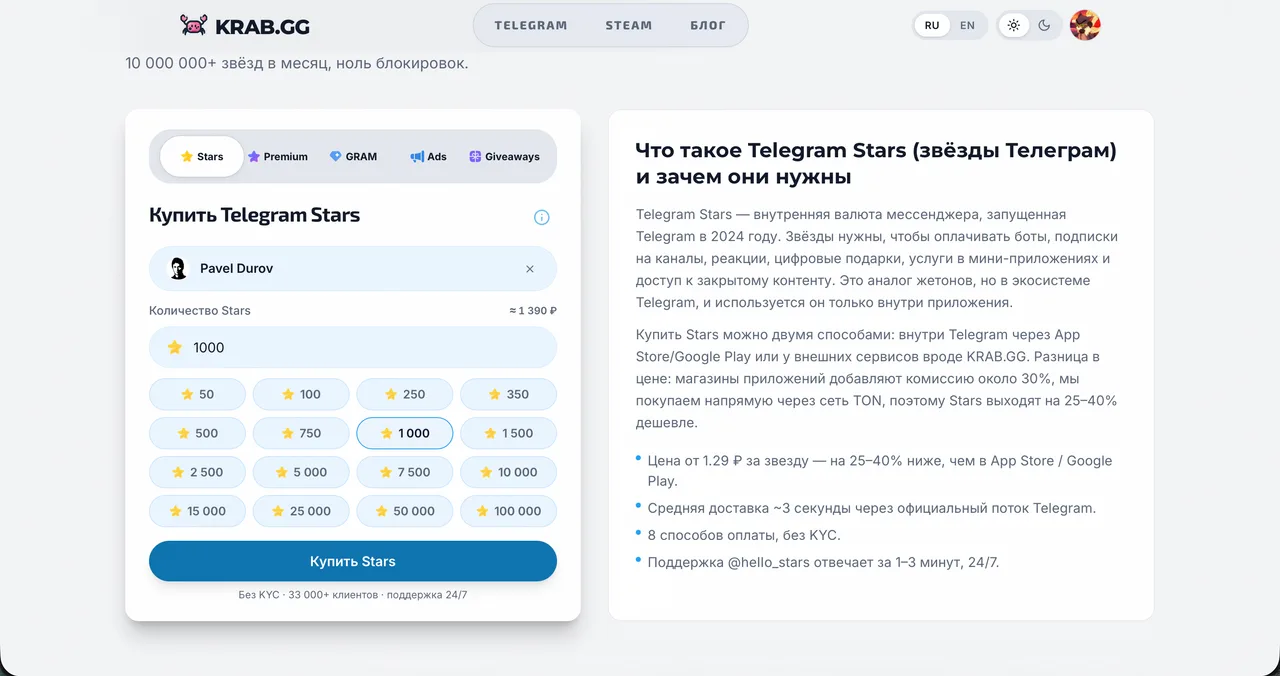
When you buy by @username, a service pays for the stars through Telegram’s built-in payment mechanism and credits them to the account you name. It is the same official flow as a purchase inside the app, without Apple or Google in the middle. You share a username, never a password.
Here’s the process at KRAB.GG with a Belarusian card:
- Open the Telegram Stars purchase page on the site or start the bot @krabggbot.
- Enter the recipient’s @username, either your own or a friend’s.
- Choose the amount. One order can be anywhere from 50 to 10,000,000 stars.
- Select payment by Belarusian bank card. Visa, Mastercard and Belkart are accepted.
- Check the total in BYN on the payment page and confirm. Your bank may ask for a 3-D Secure code.
- Wait a few minutes, then open Settings → My Stars on the recipient’s account to see the balance.
How payment in BYN works
Prices on the site are in Russian rubles. When you pay with a Belarusian card, the ruble price is converted to Belarusian rubles at the official exchange rate at the moment the payment is created. You see the final BYN amount before you confirm.
A payment method’s fee, if any, is shown when you choose it at checkout. That means the BYN total on the payment page already includes it.
What it costs and why people choose it
Stars currently start from about 1.39 RUB per star. The site states they cost up to 40% less than buying in the Telegram app. Prices move with exchange rates, so the live figure is always in the calculator on the purchase page.
Price aside, Belarusian buyers pick this route for practical reasons:
- Belkart works.
- You can buy for any account without logging in to it.
- Delivery takes minutes.
We’ve been on the market since 2024 and hold a 5/5 rating. Uptime is 99.98%, and support at @heIIo_stars replies in about 1–3 minutes on average. For a wider look at paying with local cards across our products, see our guide to Belarusian card payments for Steam, Stars and Premium.
Routes compared: price, speed and risk
Here are the four routes side by side. The values are qualitative on purpose: store prices, marketplace listings and crypto rates change too often for a fixed number to stay accurate.
Route | Belarusian card | What you need | Speed | Main risk |
|---|---|---|---|---|
In-app (App Store / Google Play) | Visa/Mastercard as a rule; Belkart usually not | Store account with a linked card | Instant | Store markup, declines on region mismatch |
Crypto (TON) | Only indirectly, to buy TON via P2P | Wallet, P2P deal, some crypto experience | Depends on the P2P step | Rate swings, irreversible transfers |
Marketplaces | Depends on the platform’s checkout | Marketplace account, a reliable seller | Minutes, or longer if delivery is manual | Seller quality |
@username service | Visa, Mastercard, Belkart, paid in BYN | Recipient’s @username | Within minutes | Typo in the username |
A worked example
Take 100 stars:
- In the app: the reference price was 179 RUB, per Sber’s December 2025 figure.
- By @username: at the “from” price of about 1.39 RUB per star, the same 100 stars come to roughly 139 RUB.
That’s about 40 RUB less, before any payment-method fee shown at checkout. App packages don’t always scale in a straight line, so for larger amounts compare the exact store price of your package with the calculator.
To estimate the bill in BYN yourself, use the official rate, which is quoted per 100 Russian rubles:
BYN total ≈ price in RUB × (official BYN rate per 100 RUB) ÷ 100
The payment page does this conversion for you when the payment is created. Treat your own calculation as a sanity check, not the final number.
Which route fits which buyer
- You need 50 stars right now and have a Visa in your App Store account: the app is fine.
- You already hold TON: the crypto route saves you the P2P step, which is its slowest part.
- You want the lowest listing and don’t mind waiting: use a marketplace and pick a well-reviewed seller.
- You pay with Belkart, buy for someone else or buy in bulk: buy by @username.
Card declined or stars missing: what to do

Most problems with buying Stars from Belarus fall into two groups. Either the payment doesn’t go through, or the money leaves your card and the stars don’t show up. Follow the branch that matches your case.
The payment fails
- App Store or Google Play with a Belkart card: as a rule, the stores don’t accept Belkart. Use a Visa or Mastercard, or a route that takes Belkart.
- App Store or Google Play with Visa or Mastercard: check in your banking app that online and foreign payments are enabled and that you haven’t hit a per-transaction limit. Then make sure your store account’s region matches your card’s country.
- On a service’s payment page: complete the 3-D Secure step and check your card’s limits for online payments. Remember the 1,000 BYN cap per Belarusian card payment; if your amount is higher, split the order.
The money left but the stars didn’t arrive
- In-app purchase: wait a few minutes, restart Telegram and check the store’s purchase history. If the stars still aren’t there, contact Telegram support. The DTF guide to buying Stars describes the path Help → Payment problems → Stars not credited. You can also raise a purchase made through Apple or Google with the store.
- Order by @username: ask the recipient to open Settings → My Stars, and double-check the username in your order. If everything matches and the balance hasn’t changed, send your order details to support. Ours replies in about 1–3 minutes on average.
- A hold, not a charge: if an order failed, your card may show a pending authorization. How quickly it disappears depends on your bank, not on the seller.
Stay safe and pick the right product

Wherever money and accounts meet, scammers follow, and Stars are no exception. A short checklist covers almost every real risk. After that, make sure Stars are actually the product you need.
Safety checklist
- Never share a password, login code or 2FA password. A legitimate Stars purchase needs only the recipient’s @username.
- Ignore “free stars” offers. Bots and channels promising free stars are a classic phishing trick. The only way to get stars without paying is for someone to send them: a gift, payment for your content or a win in an official channel giveaway.
- Expect official delivery. Properly bought stars appear in My Stars like any regular top-up.
- On marketplaces, stay on the platform. Pay and chat inside it so the platform’s buyer protection applies.
- The “friend abroad” route works only on trust. You can ask someone with a foreign card to buy for you, but you’re trusting that person with your money.
- Know who you’re paying. Reputable services show their company details; ours are at the bottom of every page.
Stars prices change with exchange rates, and the figures in this guide are for orientation only. The current price is always on the payment page. This isn’t financial advice, and any purchase should follow Telegram’s terms.
Stars, Premium or GRAM?
- Stars are Telegram’s in-app currency. You spend them on gifts, paid posts and media, mini apps and games, reactions and support for creators. Our explainer on what Telegram Stars are for in 2026 goes through each use.
- Telegram Premium is a subscription, not a currency. To gift Premium to a friend, buy it directly by @username for 3, 6 or 12 months. The Telegram Premium page lists current prices, starting from about 1,189 RUB for three months.
- GRAM is a coin on the Telegram account balance, spent on gifts in the Telegram gift shop and on post promotion. It is a separate product from Stars.
- Channel owners can run a Stars giveaway for their channel. You buy a pool from fixed packages between 500 and 1,000,000 stars, and it appears to the channel’s admins under Statistics → Boosts. An admin then launches it and sets the end date. We size giveaways so every winner gets at least 100 stars.
Bottom line for buyers in Belarus
Each route has its place:
- The app store is fine for a quick, small purchase with a Visa or Mastercard.
- Crypto suits people who already hold TON.
- Marketplaces reward patience and careful seller checks.
For most buyers in Belarus, though, paying by @username with a local card is the shortest path. Belkart works, the BYN total is shown before you pay, and the stars arrive within minutes without anyone touching your account. It also handles the cases where the app store is awkward: buying for someone else, buying in bulk or paying without a Visa.
If that fits, open the calculator, enter a username and see the exact BYN total for your amount. You can buy Telegram Stars on KRAB.GG whenever you’re ready.
FAQ
Can I buy Telegram Stars with a Belarusian card?
Yes. App Store and Google Play usually accept Belarusian Visa and Mastercard cards but, as a rule, not Belkart. Services that sell Stars by @username, such as KRAB.GG, accept Visa, Mastercard and Belkart and show the total in BYN, with up to 1,000 BYN per card payment.
Do I need a VPN to buy Telegram Stars in Belarus?
No. A VPN doesn't change which cards an app store accepts or which country your store account belongs to. Buying by @username with a Belarusian card doesn't go through store billing at all.
Can I buy Telegram Stars for someone else's account?
Yes. When you buy by @username, you enter the recipient's username and the stars are credited to that account. Check the username carefully: it starts with @ and is not the same as the display name.
What should I do if I paid but the stars didn't arrive?
Wait a few minutes, then check Settings → My Stars on the recipient's account. For an in-app purchase, contact Telegram support via Help → Payment problems. For an order by @username, send your order details to the seller's support. KRAB.GG support (@heIIo_stars) replies in about 1–3 minutes on average.
Is it safe to buy Telegram Stars through a third-party service?
Yes, as long as the service asks only for a @username and never for a password or login code. Properly bought stars arrive through Telegram's official payment mechanism and appear in My Stars like a regular top-up.

We cover Telegram Stars, Premium and payments — clearly and to the point
13 min read